MyThinkPond

On Java, Python, Groovy, Grails, Spring, Node.js, Linux, Arduino, ARM, Embedded Devices & Web

Archive for the ‘Linux’ Category

CentOS 7 - How to open ports in firewalld?

Posted by Venkatt Guhesan on March 23, 2016

Prior to CentOS 7, “iptables” and “shorewall” were the two options avaiable. Since CentOS-7, the default firewall tool is “firewalld”.

Here is a short-guide on how to open two ports in the firewalld application:

firewall-cmd --get-active-zones
# Lets open Jetty Web Server port
firewall-cmd --zone=public --add-port=8080/tcp --permanent
# Lets open some other port 4242 for TCP
firewall-cmd --zone=public --add-port=4242/tcp --permanent
# Commit changes
firewall-cmd --reload
firewall-cmd --list-all

Cheers.

Posted in CentOS7, Linux, Uncategorized | Tagged: , , , , | Leave a Comment »

How to configure OpenTSDB (or any process) as a service in CentOS 7?

Posted by Venkatt Guhesan on March 23, 2016

CentOS 7 uses Systemd for managing services (prior to CentOS 7 it was using upstart-init.d to manage the services).

Step-1: Create CentOS 7 Service file: vim /usr/lib/systemd/system/opentsdb.service

[Unit]
Description=OpenTSDB Service
After=network.target hbase.service
[Service]
Type=forking
PrivateTmp=yes
ExecStart=/usr/share/opentsdb/etc/init.d/opentsdb start
ExecStop=/usr/share/opentsdb/etc/init.d/opentsdb stop
Restart=on-abort
[Install]
WantedBy=multi-user.target

Step-2: Let’s test the start and stop of this new OpenTSDB service

$ sudo systemctl start opentsdb
# If it starts up good, you should see the website when you goto http://<servername>:4242/
ps -leaf | grep "tsdb"
# shows you something similar then you can add it as a service to auto-start
sudo systemctl enable opentsdb

Step-3: (optional) Reboot node and make sure that the service starts up accordingly after a reboot.

Cheers.

Posted in Linux, CentOS7 | Tagged: , , | Leave a Comment »

Fixing vim editor for dark backgrounds so comments are not dark blue

Posted by Venkatt Guhesan on March 15, 2016

Here is a simple command that can fix your vim editor for dark backgrounds so that your comments are not showing up in dark blue (unreadable).

Example screenshot:

The temporary fix is to run the following command in the vim editor:

:set background=dark

instead of

:set background=light

The permanent fix for this is to add the command inside $HOME/.vimrc file

 set background=dark 

Please note that when you’re adding the property into the .vimrc file, you do not need to prefix it with “:”

Cheers

Posted in General, Linux | Tagged: , | Leave a Comment »

How to configure and install ZeroMQ (libsodium) on CentOS 6.7?

Posted by Venkatt Guhesan on September 6, 2015

When getting started on ZeroMQ (version 4.2.0 or above) can be quite challenging especially with all the prerequisites. I’ve spent a good two days to get the process ironed out. So I’m sharing this so that others can avoid the same pitfalls and can have a good head-start with setting up their environment.

Pitfall #1: Develop for your platform. I’m accustomed to developing in Ubuntu 14.04.3 LTE but in this case my deployment environment happens to be CentOS 6.7 (minimal server). Because the dependencies such as GLIBC versions are different, it’s best to stick to a setup with the target platform in mind.

This exercise assumes that you’ve installed CentOS 6.7 (minimal server option).

Pitfall #2:

In your research you may have come across the following errors below. I’m including them in hopes that the search engine bots will bring you to this blog so that you can save some headaches.

checking whether the C compiler works… configure: error: in `/root/downloads/libzmq-master’:
configure: error: cannot run C compiled programs.
If you meant to cross compile, use `–host’.
libsodium is not installed
src/.libs/libzmq.so: undefined reference to `crypto_secretbox_open'
src/.libs/libzmq.so: undefined reference to `crypto_box_beforenm'
src/.libs/libzmq.so: undefined reference to `crypto_secretbox'
src/.libs/libzmq.so: undefined reference to `crypto_box'
src/.libs/libzmq.so: undefined reference to `crypto_box_keypair'
src/.libs/libzmq.so: undefined reference to `sodium_init'
src/.libs/libzmq.so: undefined reference to `crypto_box_open'
src/.libs/libzmq.so: undefined reference to `randombytes_close'
src/.libs/libzmq.so: undefined reference to `crypto_box_open_afternm'
src/.libs/libzmq.so: undefined reference to `randombytes'
src/.libs/libzmq.so: undefined reference to `crypto_box_afternm'
collect2: ld returned 1 exit status
make[1]: *** [tools/curve_keygen] Error 1
make[1]: Leaving directory `/root/downloads/libzmq-<wbr />master'
make: *** [all-recursive] Error 1
GLIB 2.14 not found

Solution:

The following steps provides you a step-by-step instruction to get you to a point where you can compile the standard ZeroMQ HelloWorld Server and HelloWorld Client.

# Steps to a working ZeroMQ 4+ code on CentOS67
# Login as root or make sure you have sudo access
# The following instructions assume you are logged in as "root"
# Assumes the following path /root/downloads
mkdir download
cd download
# ZeroMQ 4+ requires libsodium 
# You also need a C compiler
# Pre-requisites
yum update
# Gets your system upto date with the latest updates
yum install libtool gcc-c++ glib*
# This installs autoconf, automake, cloog-ppl, cpp, gcc, mpfr, ppl
yum groupinstall "development tools"
# Let us install and build libsodium
wget https://download.libsodium.org/libsodium/releases/libsodium-1.0.3.tar.gz
tar -xvf libsodium-1.0.3.tar.gz
cd libsodium-1.0.3
./configure
make clean
make
make install
# libsodium libraries are now installed under /usr/local/lib directory
# Next we need to tell libzmq and other development code where to find these libraries
# Add the following exports defining the following environmental libraries
# Edit the root users .bashrc file
vim /root/.bashrc
# Add the following
#-----
export sodium_CFLAGS="-I/usr/local/include"
export sodium_LIBS="-L/usr/local/lib"
export CPATH=/usr/local/include
export LIBRARY_PATH=/usr/local/lib
export LD_LIBRARY_PATH=/usr/local/lib
export LD_RUN_PATH=/usr/local/lib
export PKG_CONFIG_PATH=/usr/local/lib/pkgconfig
export CFLAGS=$(pkg-config --cflags libsodium)
export LDFLAGS=$(pkg-config --libs libsodium)
#-----
# Reinitialize settings under .bashrc
source ~/.bashrc
# Add libsodium to ldconfig 
echo '/usr/local/lib' > tee -a /etc/ld.so.conf.d/libsodium.conf
# Download the latest lizmq from the GIT repository
cd /root/downloads
wget https://github.com/zeromq/libzmq/archive/master.zip
unzip master.zip
cd libzmq-master
# Lets begin building it
# Generate the configure script from template
./autogen.sh
./configure
make clean
make
make install
# ZeroMQ libraries are installed in /usr/local/lib path
# Need to add the libraries to ldconfig so that they can be
# statically linked in C code
# Since ZMQ is installed in the same path as libsodium,
# we do not need to add another path into /etc/ld.so.conf.d/*.conf
# we just need to reload the "ldconfig"
ldconfig
# Let try compiling and testing a sample code
mkdir /root/downloads/zmqtest
cd /root/downloads/zmqtest
# vim helloserver.c
# Copy hwserver code from the following url:
wget https://github.com/imatix/zguide/raw/master/examples/C/hwserver.c
# Copy hwclient code from the following url:
wget https://github.com/imatix/zguide/raw/master/examples/C/hwclient.c
# Compile hwserver 
gcc hwserver.c -o hwserver -lzmq
gcc hwclient.c -o hwclient -lzmq
# Open two SSH terminals to /root/downloads/zmqtest
# Run hello-world server in terminal #1
# Run hello-world client in terminal #2
# If it runs, you're all set to go
# Please link me from your blog/social places so that others can easily find this article
# Also provide me with feedback so that I can ammend this guide for others

# Thank you & cheers!


Posted in C - C++ - gcc - cpp, Kernel, Linux, ZeroMQ | Tagged: , , , | Leave a Comment »

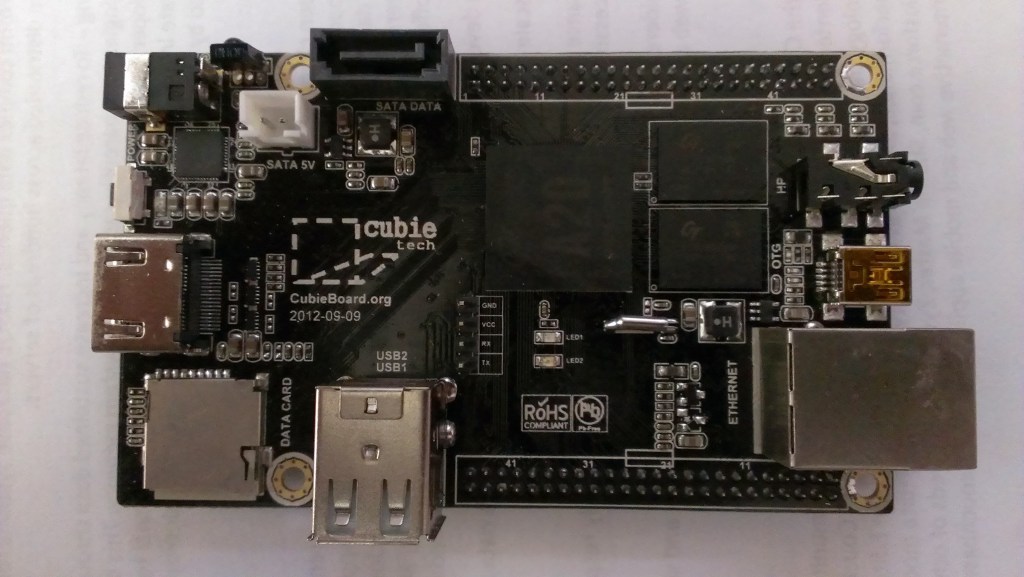
Cubieboard2 with ARM AllWinner Processor - A20 finally arrived

Posted by Venkatt Guhesan on November 3, 2013

Cubieboard2 with ARM AllWinner Processor - A20 finally arrived. Pretty excited about building my ARM Linux embedded system.

CubieTruck

Learn more about Cubieboard here

Posted in CubieBoard2 & CubieTruck, Embedded Systems, Linux, Technology | Tagged: , , | Leave a Comment »

Simulating Load on a File-System

Posted by Venkatt Guhesan on November 14, 2012

Sometimes you want an easy way to simulate load on a file-system that you are trying to test. Here’s a quick and easy way.

Suppose your mount point you want to perform this IO is “/myspecialmount”. (Assuming you have plenty of space to test)

Then the easiest way to load some IO is through the following bash-script:

#!/bin/bash
while true
do
  echo "=== Starting clean-up ===="
  rm -fr /myspecialmount/usr
  echo "=== Starting load ===="
  rsync -avp /usr /myspecialmount
done

In the above code sample, Line-6 - cleans up the filesystem sub-folder “/myspecialmount/usr”. The options “-fr” allows you to perform the clean-up recursively with a force option. And in Line-8, we synchronize the systems “/usr” folder and files onto “/myspecialmount/usr”. And these two steps are done on an infinite-loop.

Please note that this is not a true load-testing where you have parallel-simultaneous IO requests being sent to a filesystem but rather a simple way to create some load.

There are some specialized tools such as “iozone“, “bonnie” and “dbench” and others (see Filesystems section) that are sophisticated bench-marking tools available to the Linux community.

If you find this article useful, please subscribe to my blog and/or share my link with others.

Posted in Linux | Tagged: , , , , , , | Leave a Comment »

How to list the package contents of a yum install?

Posted by Venkatt Guhesan on December 25, 2011

Sometimes you need to see what’s installed as part of a package via yum. To see the package contents you can use a utility that’s available on the RHEL/CentOS.

$repoquery --list **packagename**

If you do not have this utility available, you can install it by using this command

$yum install yum-utils

Here is a sample output from looking at the package contents of Apache httpd.

$repoquery --list httpd
/etc/httpd
/etc/httpd/conf
/etc/httpd/conf.d
/etc/httpd/conf.d/README
/etc/httpd/conf.d/welcome.conf
/etc/httpd/conf/httpd.conf
/etc/httpd/conf/magic
/etc/httpd/logs
/etc/httpd/modules
/etc/httpd/run
/etc/logrotate.d/httpd
/etc/rc.d/init.d/httpd
/etc/sysconfig/httpd
/usr/lib64/httpd
/usr/lib64/httpd/modules
/usr/lib64/httpd/modules/mod_actions.so
/usr/lib64/httpd/modules/mod_alias.so
/usr/lib64/httpd/modules/mod_asis.so
/usr/lib64/httpd/modules/mod_auth_basic.so
/usr/lib64/httpd/modules/mod_auth_digest.so
/usr/lib64/httpd/modules/mod_authn_alias.so
/usr/lib64/httpd/modules/mod_authn_anon.so
/usr/lib64/httpd/modules/mod_authn_dbd.so
/usr/lib64/httpd/modules/mod_authn_dbm.so
/usr/lib64/httpd/modules/mod_authn_default.so
/usr/lib64/httpd/modules/mod_authn_file.so
/usr/lib64/httpd/modules/mod_authnz_ldap.so
/usr/lib64/httpd/modules/mod_authz_dbm.so
/usr/lib64/httpd/modules/mod_authz_default.so
/usr/lib64/httpd/modules/mod_authz_groupfile.so
/usr/lib64/httpd/modules/mod_authz_host.so
/usr/lib64/httpd/modules/mod_authz_owner.so
/usr/lib64/httpd/modules/mod_authz_user.so
/usr/lib64/httpd/modules/mod_autoindex.so
/usr/lib64/httpd/modules/mod_cache.so
/usr/lib64/httpd/modules/mod_cern_meta.so
/usr/lib64/httpd/modules/mod_cgi.so
/usr/lib64/httpd/modules/mod_cgid.so
/usr/lib64/httpd/modules/mod_dav.so
/usr/lib64/httpd/modules/mod_dav_fs.so
/usr/lib64/httpd/modules/mod_dbd.so
/usr/lib64/httpd/modules/mod_deflate.so
/usr/lib64/httpd/modules/mod_dir.so
/usr/lib64/httpd/modules/mod_disk_cache.so
/usr/lib64/httpd/modules/mod_dumpio.so
/usr/lib64/httpd/modules/mod_env.so
/usr/lib64/httpd/modules/mod_expires.so
/usr/lib64/httpd/modules/mod_ext_filter.so
/usr/lib64/httpd/modules/mod_filter.so
/usr/lib64/httpd/modules/mod_headers.so
/usr/lib64/httpd/modules/mod_ident.so
/usr/lib64/httpd/modules/mod_include.so
/usr/lib64/httpd/modules/mod_info.so
/usr/lib64/httpd/modules/mod_ldap.so
/usr/lib64/httpd/modules/mod_log_config.so
/usr/lib64/httpd/modules/mod_log_forensic.so
/usr/lib64/httpd/modules/mod_logio.so
/usr/lib64/httpd/modules/mod_mime.so
/usr/lib64/httpd/modules/mod_mime_magic.so
/usr/lib64/httpd/modules/mod_negotiation.so
/usr/lib64/httpd/modules/mod_proxy.so
/usr/lib64/httpd/modules/mod_proxy_ajp.so
/usr/lib64/httpd/modules/mod_proxy_balancer.so
/usr/lib64/httpd/modules/mod_proxy_connect.so
/usr/lib64/httpd/modules/mod_proxy_ftp.so
/usr/lib64/httpd/modules/mod_proxy_http.so
/usr/lib64/httpd/modules/mod_proxy_scgi.so
/usr/lib64/httpd/modules/mod_reqtimeout.so
/usr/lib64/httpd/modules/mod_rewrite.so
/usr/lib64/httpd/modules/mod_setenvif.so
/usr/lib64/httpd/modules/mod_speling.so
/usr/lib64/httpd/modules/mod_status.so
/usr/lib64/httpd/modules/mod_substitute.so
/usr/lib64/httpd/modules/mod_suexec.so
/usr/lib64/httpd/modules/mod_unique_id.so
/usr/lib64/httpd/modules/mod_userdir.so
/usr/lib64/httpd/modules/mod_usertrack.so
/usr/lib64/httpd/modules/mod_version.so
/usr/lib64/httpd/modules/mod_vhost_alias.so
/usr/sbin/apachectl
/usr/sbin/htcacheclean
/usr/sbin/httpd
/usr/sbin/httpd.event
/usr/sbin/httpd.worker
/usr/sbin/httxt2dbm
/usr/sbin/rotatelogs
/usr/sbin/suexec
/usr/share/doc/httpd-2.2.15
/usr/share/doc/httpd-2.2.15/ABOUT_APACHE
/usr/share/doc/httpd-2.2.15/CHANGES
/usr/share/doc/httpd-2.2.15/LICENSE
/usr/share/doc/httpd-2.2.15/NOTICE
/usr/share/doc/httpd-2.2.15/README
/usr/share/doc/httpd-2.2.15/VERSIONING
/usr/share/man/man8/apachectl.8.gz
/usr/share/man/man8/htcacheclean.8.gz
/usr/share/man/man8/httpd.8.gz
/usr/share/man/man8/rotatelogs.8.gz
/usr/share/man/man8/suexec.8.gz
/var/cache/mod_proxy
/var/lib/dav
/var/log/httpd
/var/run/httpd
/var/www
/var/www/cgi-bin
/var/www/error
/var/www/error/HTTP_BAD_GATEWAY.html.var
/var/www/error/HTTP_BAD_REQUEST.html.var
/var/www/error/HTTP_FORBIDDEN.html.var
/var/www/error/HTTP_GONE.html.var
/var/www/error/HTTP_INTERNAL_SERVER_ERROR.html.var
/var/www/error/HTTP_LENGTH_REQUIRED.html.var
/var/www/error/HTTP_METHOD_NOT_ALLOWED.html.var
/var/www/error/HTTP_NOT_FOUND.html.var
/var/www/error/HTTP_NOT_IMPLEMENTED.html.var
/var/www/error/HTTP_PRECONDITION_FAILED.html.var
/var/www/error/HTTP_REQUEST_ENTITY_TOO_LARGE.html.var
/var/www/error/HTTP_REQUEST_TIME_OUT.html.var
/var/www/error/HTTP_REQUEST_URI_TOO_LARGE.html.var
/var/www/error/HTTP_SERVICE_UNAVAILABLE.html.var
/var/www/error/HTTP_UNAUTHORIZED.html.var
/var/www/error/HTTP_UNSUPPORTED_MEDIA_TYPE.html.var
/var/www/error/HTTP_VARIANT_ALSO_VARIES.html.var
/var/www/error/README
/var/www/error/contact.html.var
/var/www/error/include
/var/www/error/include/bottom.html
/var/www/error/include/spacer.html
/var/www/error/include/top.html
/var/www/error/noindex.html
/var/www/html
/var/www/icons
/var/www/icons/README
/var/www/icons/README.html
/var/www/icons/a.gif
/var/www/icons/a.png
/var/www/icons/alert.black.gif
/var/www/icons/alert.black.png
/var/www/icons/alert.red.gif
/var/www/icons/alert.red.png
/var/www/icons/apache_pb.gif
/var/www/icons/apache_pb.png
/var/www/icons/apache_pb2.gif
/var/www/icons/apache_pb2.png
/var/www/icons/apache_pb2_ani.gif
/var/www/icons/back.gif
/var/www/icons/back.png
/var/www/icons/ball.gray.gif
/var/www/icons/ball.gray.png
/var/www/icons/ball.red.gif
/var/www/icons/ball.red.png
/var/www/icons/binary.gif
/var/www/icons/binary.png
/var/www/icons/binhex.gif
/var/www/icons/binhex.png
/var/www/icons/blank.gif
/var/www/icons/blank.png
/var/www/icons/bomb.gif
/var/www/icons/bomb.png
/var/www/icons/box1.gif
/var/www/icons/box1.png
/var/www/icons/box2.gif
/var/www/icons/box2.png
/var/www/icons/broken.gif
/var/www/icons/broken.png
/var/www/icons/burst.gif
/var/www/icons/burst.png
/var/www/icons/c.gif
/var/www/icons/c.png
/var/www/icons/comp.blue.gif
/var/www/icons/comp.blue.png
/var/www/icons/comp.gray.gif
/var/www/icons/comp.gray.png
/var/www/icons/compressed.gif
/var/www/icons/compressed.png
/var/www/icons/continued.gif
/var/www/icons/continued.png
/var/www/icons/dir.gif
/var/www/icons/dir.png
/var/www/icons/diskimg.gif
/var/www/icons/diskimg.png
/var/www/icons/down.gif
/var/www/icons/down.png
/var/www/icons/dvi.gif
/var/www/icons/dvi.png
/var/www/icons/f.gif
/var/www/icons/f.png
/var/www/icons/folder.gif
/var/www/icons/folder.open.gif
/var/www/icons/folder.open.png
/var/www/icons/folder.png
/var/www/icons/folder.sec.gif
/var/www/icons/folder.sec.png
/var/www/icons/forward.gif
/var/www/icons/forward.png
/var/www/icons/generic.gif
/var/www/icons/generic.png
/var/www/icons/generic.red.gif
/var/www/icons/generic.red.png
/var/www/icons/generic.sec.gif
/var/www/icons/generic.sec.png
/var/www/icons/hand.right.gif
/var/www/icons/hand.right.png
/var/www/icons/hand.up.gif
/var/www/icons/hand.up.png
/var/www/icons/icon.sheet.gif
/var/www/icons/icon.sheet.png
/var/www/icons/image1.gif
/var/www/icons/image1.png
/var/www/icons/image2.gif
/var/www/icons/image2.png
/var/www/icons/image3.gif
/var/www/icons/image3.png
/var/www/icons/index.gif
/var/www/icons/index.png
/var/www/icons/layout.gif
/var/www/icons/layout.png
/var/www/icons/left.gif
/var/www/icons/left.png
/var/www/icons/link.gif
/var/www/icons/link.png
/var/www/icons/movie.gif
/var/www/icons/movie.png
/var/www/icons/p.gif
/var/www/icons/p.png
/var/www/icons/patch.gif
/var/www/icons/patch.png
/var/www/icons/pdf.gif
/var/www/icons/pdf.png
/var/www/icons/pie0.gif
/var/www/icons/pie0.png
/var/www/icons/pie1.gif
/var/www/icons/pie1.png
/var/www/icons/pie2.gif
/var/www/icons/pie2.png
/var/www/icons/pie3.gif
/var/www/icons/pie3.png
/var/www/icons/pie4.gif
/var/www/icons/pie4.png
/var/www/icons/pie5.gif
/var/www/icons/pie5.png
/var/www/icons/pie6.gif
/var/www/icons/pie6.png
/var/www/icons/pie7.gif
/var/www/icons/pie7.png
/var/www/icons/pie8.gif
/var/www/icons/pie8.png
/var/www/icons/portal.gif
/var/www/icons/portal.png
/var/www/icons/poweredby.png
/var/www/icons/ps.gif
/var/www/icons/ps.png
/var/www/icons/quill.gif
/var/www/icons/quill.png
/var/www/icons/right.gif
/var/www/icons/right.png
/var/www/icons/screw1.gif
/var/www/icons/screw1.png
/var/www/icons/screw2.gif
/var/www/icons/screw2.png
/var/www/icons/script.gif
/var/www/icons/script.png
/var/www/icons/small
/var/www/icons/small/back.gif
/var/www/icons/small/back.png
/var/www/icons/small/binary.gif
/var/www/icons/small/binary.png
/var/www/icons/small/binhex.gif
/var/www/icons/small/binhex.png
/var/www/icons/small/blank.gif
/var/www/icons/small/blank.png
/var/www/icons/small/broken.gif
/var/www/icons/small/broken.png
/var/www/icons/small/burst.gif
/var/www/icons/small/burst.png
/var/www/icons/small/comp1.gif
/var/www/icons/small/comp1.png
/var/www/icons/small/comp2.gif
/var/www/icons/small/comp2.png
/var/www/icons/small/compressed.gif
/var/www/icons/small/compressed.png
/var/www/icons/small/continued.gif
/var/www/icons/small/continued.png
/var/www/icons/small/dir.gif
/var/www/icons/small/dir.png
/var/www/icons/small/dir2.gif
/var/www/icons/small/dir2.png
/var/www/icons/small/doc.gif
/var/www/icons/small/doc.png
/var/www/icons/small/forward.gif
/var/www/icons/small/forward.png
/var/www/icons/small/generic.gif
/var/www/icons/small/generic.png
/var/www/icons/small/generic2.gif
/var/www/icons/small/generic2.png
/var/www/icons/small/generic3.gif
/var/www/icons/small/generic3.png
/var/www/icons/small/image.gif
/var/www/icons/small/image.png
/var/www/icons/small/image2.gif
/var/www/icons/small/image2.png
/var/www/icons/small/index.gif
/var/www/icons/small/index.png
/var/www/icons/small/key.gif
/var/www/icons/small/key.png
/var/www/icons/small/movie.gif
/var/www/icons/small/movie.png
/var/www/icons/small/patch.gif
/var/www/icons/small/patch.png
/var/www/icons/small/ps.gif
/var/www/icons/small/ps.png
/var/www/icons/small/rainbow.gif
/var/www/icons/small/rainbow.png
/var/www/icons/small/sound.gif
/var/www/icons/small/sound.png
/var/www/icons/small/sound2.gif
/var/www/icons/small/sound2.png
/var/www/icons/small/tar.gif
/var/www/icons/small/tar.png
/var/www/icons/small/text.gif
/var/www/icons/small/text.png
/var/www/icons/small/transfer.gif
/var/www/icons/small/transfer.png
/var/www/icons/small/unknown.gif
/var/www/icons/small/unknown.png
/var/www/icons/small/uu.gif
/var/www/icons/small/uu.png
/var/www/icons/sound1.gif
/var/www/icons/sound1.png
/var/www/icons/sound2.gif
/var/www/icons/sound2.png
/var/www/icons/sphere1.gif
/var/www/icons/sphere1.png
/var/www/icons/sphere2.gif
/var/www/icons/sphere2.png
/var/www/icons/tar.gif
/var/www/icons/tar.png
/var/www/icons/tex.gif
/var/www/icons/tex.png
/var/www/icons/text.gif
/var/www/icons/text.png
/var/www/icons/transfer.gif
/var/www/icons/transfer.png
/var/www/icons/unknown.gif
/var/www/icons/unknown.png
/var/www/icons/up.gif
/var/www/icons/up.png
/var/www/icons/uu.gif
/var/www/icons/uu.png
/var/www/icons/uuencoded.gif
/var/www/icons/uuencoded.png
/var/www/icons/world1.gif
/var/www/icons/world1.png
/var/www/icons/world2.gif
/var/www/icons/world2.png

Posted in Linux | Tagged: , , , | Leave a Comment »

 
Follow

Get every new post delivered to your Inbox.

Join 149 other followers